Trade Shares on the (TTSE) Trading Online Platform
Take charge of your investments with the Trinidad and Tobago Stock Exchange (TTSE) Trading Online Platform (TOP).
Smart. Secure. Flexible. Buy and sell shares on the local/domestic and regional markets on your own terms. Whether you’re at home, on the go or abroad, TOP keeps you connected to every opportunity directly from your device.

How to get started
Here is your Step-by-Step Guide to Trading with the TTSE Trading Online Platform (TOP).
Step 1 – Register Online with TTSE
Click the Sign Up button below to create your account. You will be redirected to the TTSE website, click Sign Up and complete the registration form. Once completed, check your email to activate your account.
Step 2 – Get to Know the TTSE
Before you get started, take a few minutes to watch the introductory videos and explore the TTSE documents below.
Step 3 – Fund Your TOP Trading Account
Before you can place your first trade, you’ll need to add funds to your account.
Step 4 – Place Your First Trade on TOP
Now that your account is funded, you are ready to trade. Log in to TTSE Trading Online Platform (TOP) and follow the steps below.
Step 3 – Fund Your TOP Trading Account
Before you can place your first trade, you’ll need to add funds to your account. Here’s how:
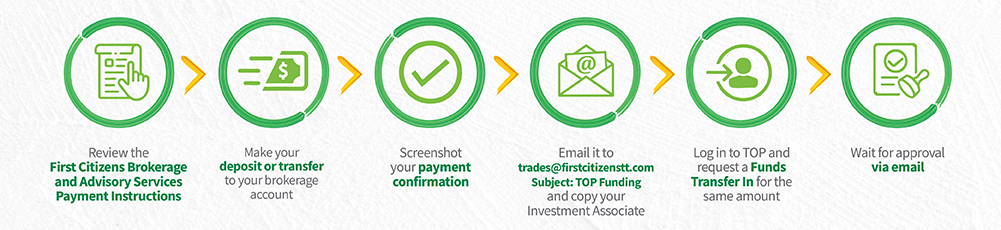
Once approved, the amount will appear under Available Balance in in your TOP account. You’re now ready to place your first trade.
First Citizens Brokerage and Advisory Services Payment methods
to purchase shares:
FIRST CITIZENS BANK TO FIRST CITIZENS BANK TRANSFER
| Go to My Payments → Manage Payees→ Click + button→ Select Standard Payee Standard Payee Information: FIRST CITIZENS BRK’GE & ADVISORY SERVICES Account with Payee: Enter Your TTCD / Brokerage Number – Your Investment #: 7 digits- 10 digits Enter ‘xxxxxx-xxxxxxxxxx’ Account/Policy Holder Name: Enter Name as per your Brokerage Account Comments: Include the details for the transaction e.g. Purchase of XYZ Shares on TOP Platform Note: daily limit of $20,000.00 Please email confirmation of payment to trades@firstcitizenstt.com with the subject line “TOP Funding” |
OTHER BANK TO FIRST CITIZENS BANK TRANSFER
| Bank: FIRST CITIZENS BANK Name on Account/ Payee: FIRST CITIZENS BRK’GE & ADVISORY SERVICES Account Number: 1243486 Account Type: Chequing Comments: Include the details for the transaction e.g. (Purchase of XYZ shares on TOP Platform f/o John Doe Investment #…) Note: daily limit varies by institution Please email confirmation of payment to trades@firstcitizenstt.com with the subject line “TOP Funding” |
FIRST CITIZENS BANK IN-BRANCH DEPOSIT
| Funds can be deposited at any FIRST CITIZENS BANK Branch to the account: NAME: FCBAS ACCOUNT NUMBER: 1243486 Please ensure that a detailed description is included when making the deposit. e.g. (Purchase of XYZ shares on TOP Platform f/o John Doe, Investment #…). Please email confirmation of payment to trades@firstcitizenstt.com with the subject line “TOP Funding” |
LINX
We accept Linx transactions only at any of our offices.
Notes:
Linx transaction only. This does not include Debit Mastercard or Visa cards.
Your respective bank may have a daily imposed limit on your LINX card.
CHEQUES
| Made payable to: FIRST CITIZENS BROKERAGE AND ADVISORY SERVICES LIMITED Can be deposited over the counter at any First Citizens Branch or delivered in person to any of the offices of First Citizens Investment Services Limited. Note: Only Personal or Managers’ cheques accepted. We do not accept 3rd party cheques. |
Step 4 – Place Your Trade on TOP
Follow these steps on the Trading Online Platform (TOP):

You’ve made your first trade. Keep building your portfolio with TOP.
Trade Independently | Grow Confidently | Build Wealth
For further assistance, please contact your Investment Associate or send an email to trades@firstcitizenstt.com.